
Rule Engine
Information
Related task: See Manage Rules to create, edit, group, and enable Rules.
This reference defines the Rule Engine terms, logic, trigger families, and action families used by the hi system. A Rule evaluates one or more triggers and performs its configured actions when the trigger expression evaluates positively.
Overview
Rules can support Tally-driven GPO switching, scheduled actions, parameter changes, routing actions, Snapshot recall, and Metadata or Tag updates. Rule Groups allow related Rules to be enabled or disabled together.
Concept
The Rule Engine listens to events from many parts of the hi system and can trigger actions across the system.
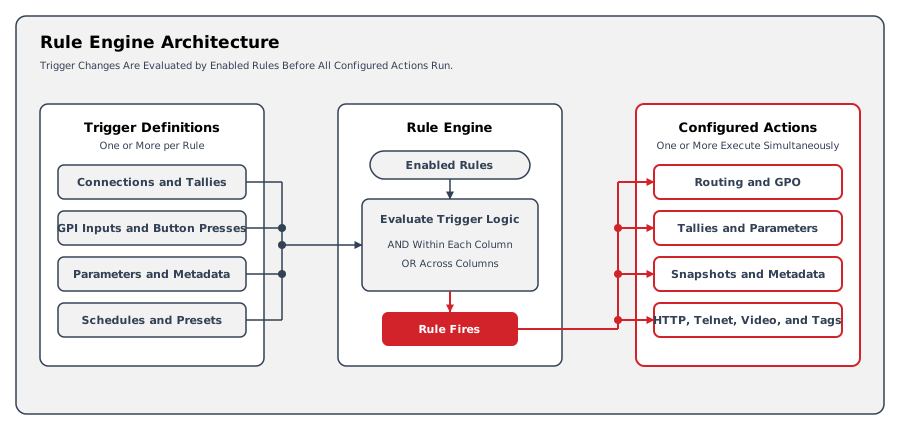
A Rule consists of one or more trigger definitions and one or more action definitions. Rules are organized into Rule Groups for easier management. Rule Groups can be enabled or disabled as a unit, which is useful for switching between different operational configurations (for example, enabling a "Show" group and disabling a "Rehearsal" group).
Many system events can serve as a trigger: Tally changes, GPI status changes on connected hiContact GPIO boxes, changes of parameters monitored by the system, or a scheduled timestamp. Multiple triggers can be combined in the same Rule with a logical relation between them. Each time a trigger changes, the Rule Engine evaluates the trigger side of the Rule. If the trigger side evaluates positively, the Rule fires and the configured actions are performed.
Actions can influence many parts of the system - for example, changing Tallies, setting GPOs on connected boxes, or changing parameters. Multiple actions can be combined in a single Rule. All actions execute simultaneously once the trigger side evaluates positively and the Rule fires.
Stateful and Event-based Rules
A Rule and its triggers and actions can be either stateful or event-based.
Stateful Rules
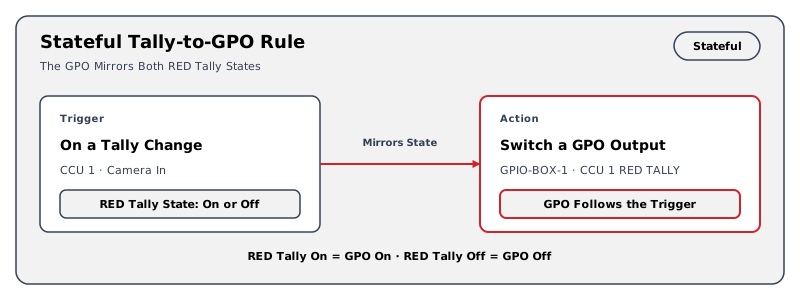
A stateful Rule can be active or inactive, and stateful actions can follow this state.
Information
Example: "When the RED Tally is active on 'CCU 1' / 'Camera In', let 'CCU 1 RED TALLY' on GPIO-BOX-1 follow the trigger." The status of the GPO 'CCU 1 RED TALLY' follows the status of the Tally on the specified Port.
Event-based Rules
An event-based Rule fires when something changes. It does not provide an active or inactive state, so it can use only actions that do not require a state.
Combining Stateful and Event-based Triggers and Actions
Combining multiple stateful triggers makes the Rule stateful, so stateful actions are available. Combining stateful and event-based triggers makes the Rule event-based, so only actions that do not require a state are available.
Multi-Trigger Logic (AND/OR Combinations)
When a Rule has multiple triggers, the logical relationship between them is configured using a column-based system:
-
Each column represents an AND-combination: all triggers set to ON within a column must be active for that column to evaluate as true.
-
Multiple columns are OR-combined: if any column evaluates as true, the Rule fires.
-
Within each column, triggers can be set to ON (must be active), OFF (must be inactive), or empty (ignored for this column).
This system allows complex logical expressions. For example, to create the logic "Fire when Button A is pressed AND Source X is connected to Destination Y, OR when Button B is pressed alone," configure two columns: Column 1 with both triggers set to ON, and Column 2 with only Button B set to ON.
Available Triggers
|
Trigger Type in the Interface |
Description |
Stateful Variants |
Event-Based Variants |
|---|---|---|---|
|
on a Connection / Crosspoint |
Monitors a defined output Port and fires when a change occurs |
When a specific Source is connected to a specific Destination |
When the Source of a specific Destination changes |
|
on a GPI Input |
Monitors a GPI input Port from a hiContact GPIO box |
When a specific GPI is ON (or OFF) |
When the status of a specific GPI changes |
|
on a Tally change |
Monitors a Tally color in hi |
When a Tally on a specific Essence Port goes ON or OFF |
When any Tally of a defined color changes |
|
on Button press |
Creates a button on the Control Panel and Hardware Panels |
A button of "toggle" type (on/off) |
A button of "push" type (fire once) |
|
on Parameter change |
Monitors a pinned parameter |
When the parameter has a specific value or meets a configured state condition |
On a change of the parameter's value |
|
on Schedule |
Fires on a configured date and time, which can recur hourly, daily, or at another interval |
- |
When the current time moves past the configured timestamp |
|
on Metadata change |
Monitors a Port for a specified metadata key |
When metadata has a specific value for a key |
On any change of metadata at a specified key |
|
on Preset Change |
Monitors Preset activity for selected users or panels |
While a configured Preset remains active |
When a user enters or leaves a configured Preset |
Available Actions
|
Action Type in the Interface |
Description |
Variants requiring state |
Variants not requiring state |
|---|---|---|---|
|
create a Connection / Crosspoint |
Connects an input to an output on a routing Node |
Create connection when active/inactive
|
Create connection when active
|
|
switch a GPO Output |
Closes a configured GPO on a hiContact GPIO box |
Let GPO follow the trigger |
Set GPO ON
|
|
change a Tally |
Changes Tally status on a specific Essence Port |
Let Tally follow the trigger |
Set Tally on
|
|
activate / deactivate Tally |
Changes status of a Tally Source |
Let Tally follow the trigger |
Enable/disable Tally from Source |
|
change a Parameter |
Changes value of a pinned parameter |
Set value when active/inactive
|
Set value when active |
|
recall a Snapshot |
Recalls a Snapshot |
Recall when active/inactive
|
Recall when active |
|
send HTTP Request |
Sends an HTTP request to an endpoint |
- |
send HTTP Request |
|
enable / disable a Rule or a Rule Group |
Enables or disables Rules or groups |
Enable/disable following trigger |
Enable/disable selected Rule/group |
|
change Metadata |
Inserts a key/value-pair of Metadata on an Essence Port |
Metadata follows trigger |
Set Metadata
|
|
control a Video Server |
Controls playback on a video server player channel |
- |
Stop
|
|
send commands via telnet |
Sends a text command to a device using Telnet |
- |
Send command to host:port with optional CR+LF |
|
assign / unassign Tags To Ports |
Updates Tag assignments on Ports based on trigger conditions |
Set Tag when active/inactive |
Set Tag when active |
|
lock / unlock destination ports |
Locks or unlocks selected Destination Ports
|
Lock follows Trigger |
Lock
|
For Follow source of trigger if available, see the routing example, GPO Impulse for pulse behavior, and Destination Lock States Reference for lock authority.
Constraints
-
An on Button press trigger needs at least one Tag before its button appears on the Control Panel or the Hardware Panels. See Creating Rules.
-
A Rule that combines stateful and event-based triggers is event-based and can use only actions that do not require state.
-
Trigger and action availability depends on the configured resources, connected devices, and supported integrations.
-
Creating or changing Rules requires the Rule admin role and the applicable installed license scope.
Related Procedures
-
See Manage Rules for creating, editing, and managing Rules and Rule Groups in the system.
-
See Tally and Labels for the Tally propagation model used by Tally triggers and actions.