
Port Containers
Information
Related task: See Port Container Setup to create, edit, and operate Port Containers.
Overview
Port Containers group related Ports so they can be presented and routed as a single Source or Destination. They are commonly used for UHD signals, audio-follow-video workflows, and other resources made up of multiple linked signals.
Port Containers support:
-
Grouped routing - bundled slots route together from a single Source or Destination selection.
-
Consistent slot order - hi resolves Source and Destination containers by slot position.
-
Audio Shuffling - operators can reorder container audio channels in the routing confirmation dialog before taking a route.
-
Simplified operator view - operators can work with a named container instead of each individual Port in the bundle.
About Port Containers
A Port Container is a named group that holds multiple Port assignments (slots). Regardless of the number of slots inside, it is displayed to an operator as a single Source or Destination.
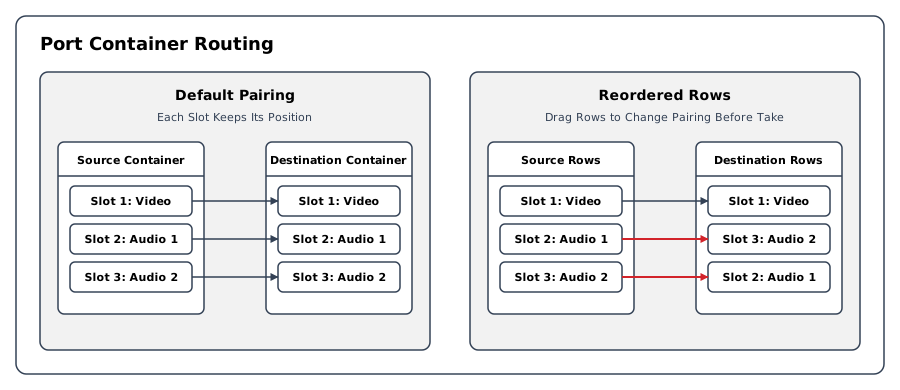
When a Source container is routed to a Destination container, hi resolves the containers to their individual Ports by slot position and connects them in order. In the Connect Port Containers dialog, an operator can reorder Source and Destination rows to change the slot pairings for that route. See Audio Shuffling.
Operational Implications
A Port Container appears as one routing entity while retaining an ordered set of underlying Flow Port assignments. Changes to container contents can affect existing routes when connection updates are applied.
See Port Container Setup for the creation, editing, assignment, and connection-update workflows.
UHD Port Containers
A common use case for Port Containers is UHD (4K) signal routing. A single UHD signal is typically transported over four parallel SDI links (quad-link 3G-SDI). By placing these four SDI Ports into a single Port Container, the operator routes one "UHD" Source instead of managing four discrete connections. hi resolves the container into the corresponding Port connections from one operator request. Verify the resulting routes using the connection status indicators.
Audio-Follow-Video
Port Containers also enable audio-follow-video workflows. A container can bundle a video Port together with its associated audio Ports. When this container is routed, hi requests the corresponding video and audio connections together. Review the Port mapping and verify the resulting connections; a request alone does not establish that every device connection succeeded.
Audio Shuffling
When routing from the hi web interface, the connection dialog allows the operator to reorder audio channels within a container before confirming the route. Drag the Source or Destination rows into the required order; the row numbers show which Ports will be paired. Review the pairings before taking the route. This is useful when the audio channel assignment on the Source does not match the expected order on the Destination, for example when English and German language channels are in different positions.
Portals Inside Port Containers
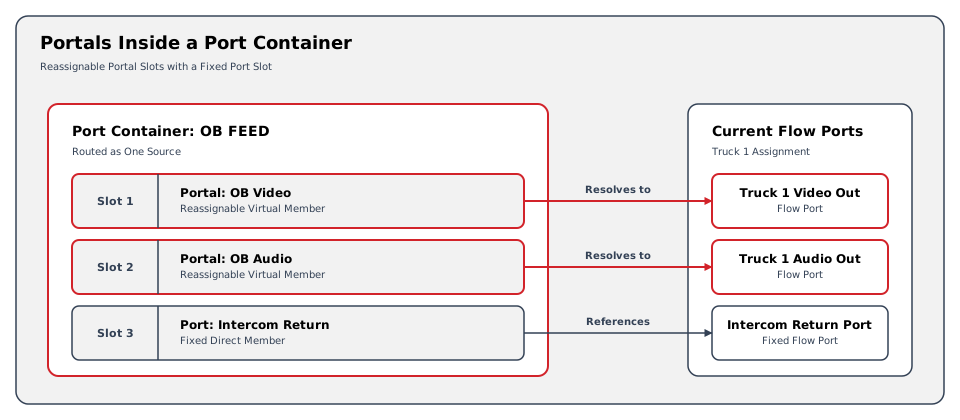
A Port Container can include Portals alongside direct Flow Port assignments. The Portal slots remain reassignable without changing the container definition.
This is useful for multi-signal resources whose underlying Flow Port assignments change while the operator-facing container remains stable.
Related Topics
-
See Port Container Setup for creating, editing, and managing Port Containers.
-
Port Containers appear on the Control Panel in the same way as regular Ports, marked by the container icon.
-
For virtual Sources and Destinations that abstract physical infrastructure, refer to Portals.
-
For the full technical reference covering Layers, Ports, containers, Portals, and Signal Paths, see Signal Routing Reference.