
Tally and Labels
Information
Related task: See Manage Tally to manage Tally definitions and review active Tally influences.
Overview
The hi system calculates Tally and label information using the configured Topology. When a Tally Source changes state, the system evaluates the relevant rooted Signal Path and updates the affected Essence Ports.
Tally and label handling includes:
-
Topology-based Tally propagation - Tally is evaluated across relevant rooted Signal Paths.
-
Dynamic Labels - labels can be transported to supported Multiviewers, vision mixers, and Hardware Panels.
-
Metadata propagation - key-value Metadata follows its configured propagation rules.
-
Rule triggers - Tally changes can trigger actions in the Rule Engine.
Tally in hi
Because hi knows the system Topology of an installation, it can provide Tally information automatically.
A device can report a Tally on a Port. The hi system resolves the relevant signal origin and rooted Signal Path, then applies the result to the affected Essence Ports.
A Tally change on any Port in the system can trigger a Rule. The Rule can then perform an action - for example, closing a GPO contact on a hiContact GPIO box.
Information
See also: Concepts: Topology Simulation for details on the system Topology model.
Caution
Since Tally propagation in the system relies heavily on the system Topology, create the Nodes and the Wiring before starting to configure Tallies.
How Tally Travels Through the hi system
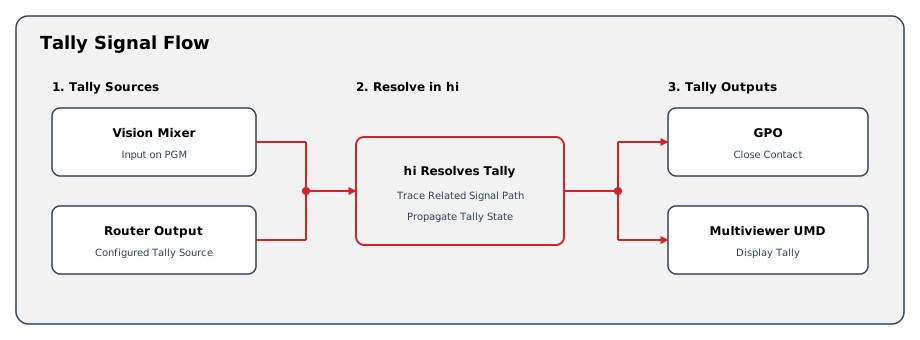
This diagram illustrates the path Tally information takes through the hi system. The path starts at a vision mixer, or at a router output configured to create Tally, and ends at a GPO or a Multiviewer UMD.
Tally Propagation Through the Topology
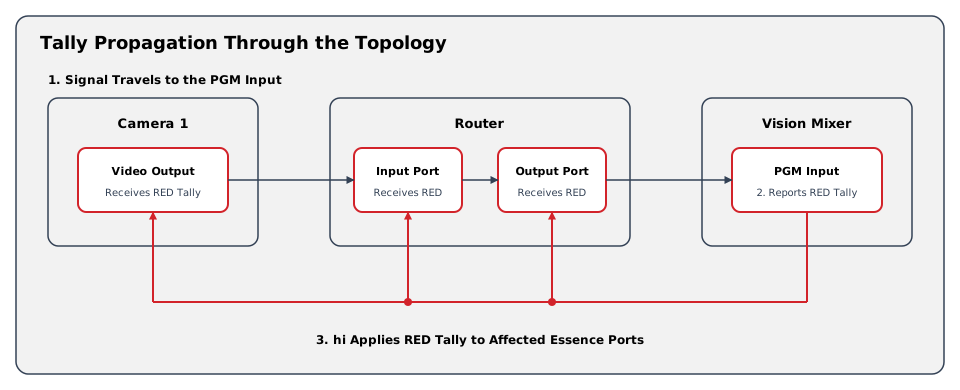
This diagram traces a concrete example: a camera signal routed through a router to a vision mixer. When the vision mixer puts the signal on PGM, hi evaluates the relevant rooted Signal Path and applies the Tally to the affected Essence Ports.
Tally Sources
Several parts of the hi system can create Tally information. These are referred to as Tally Sources.
|
Tally Source |
Example |
|---|---|
|
Tally Assignment in a Vision Mixer Node |
"Suite A PGM A" on "V-MIX 1" triggers "ORANGE TALLY" in hi. |
|
Tally Assignment to a Router Output |
"TX A" on Router "MediorNet" triggers "EMERGENCY RED TALLY" in hi. |
|
A Tally Rule Action |
A Rule toggles the status of "Tally RED" on "EXT 15" on "Router 1" with an external GPI. |
Labels
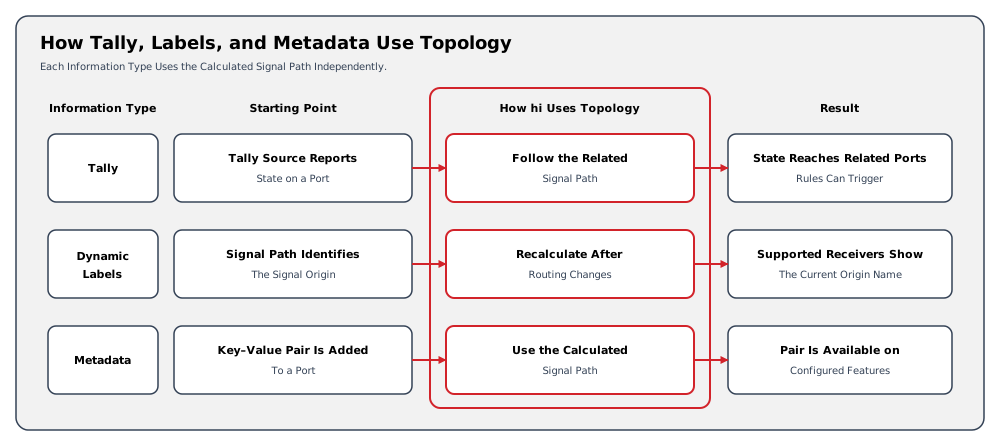
Dynamic Labels can use the calculated signal origin and send the selected label to configured UMD or mixer targets. Label direction and target behavior are configured separately from Tally propagation.
Metadata
Caution
Metadata is stored as key-value pairs associated with Ports. Metadata can be made available to configured downstream features using the calculated Signal Path. Do not assume that Metadata uses the same direction or targets as Tally.
Operational Implications
For a camera routed to a vision mixer, the mixer reports its Tally state. The configured Topology identifies the affected Essence Ports. Changing the route can change the affected Essence Ports. Supported device capabilities and configured targets determine where Tally and labels appear.
Related Tasks and Reference
-
Use Manage Tally to define, enable, and manage Tallies.
-
Use Inspect a Signal Path to review the calculated Essence Layer path.
-
Use View and Edit Topology to review the Nodes and Wiring underlying the calculation.
-
See Rule Engine for the relationship between Tally changes and automated actions.