
Portals
Overview
Portals decouple operator-facing resources from fixed Flow Ports. A Portal can keep the same logical name and identity while its underlying Flow Port assignment changes.
Portals support:
-
Consistent operator workflows - panel Presets, button labels, and automation Rules can reference the Portal rather than a specific Flow Port.
-
Resource reassignment - cameras, feeds, or recorders can be moved by reassigning the Portal.
-
Reduced setup changes - show or infrastructure changes can often be handled by Portal reassignment instead of editing every downstream reference.
-
Logical-to-physical mapping - operators route the logical Portal while administrators manage the physical assignment.
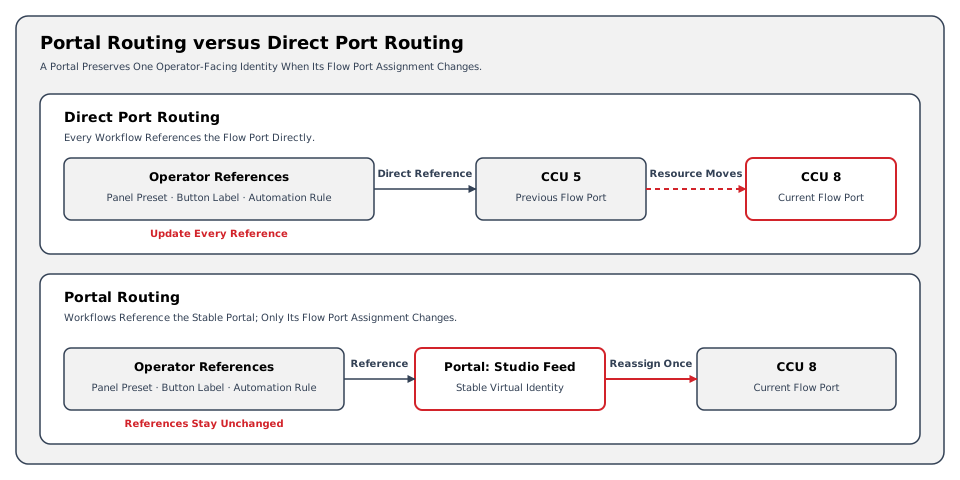
Direct references remain tied to a specific Flow Port. Portal references retain a logical identity when the administrator changes the assigned Flow Port.
Device integrations may create Ports with the Portal behavior. hi treats those device Ports as bidirectional endpoints; they are not Portal objects.
Operators create Portal objects from the Portals page.
How Portals Work
A Portal is a specialized Port Container that manages exactly one slot. It acts as a virtual routing point with a persistent name and identity. The Portal's slot references one Flow Port, another Portal, or remains unassigned. An administrator can change that assignment without changing the Portal's operator-facing identity.
Each Portal carries a format type, such as SDI or Audio, that determines which other endpoints it can connect to. When an operator selects a Portal on the routing panel, the system evaluates format compatibility and disables incompatible targets.
Portal Connections
Portals can connect to standard Ports or to other Portals:
-
Portal-to-Port: the Portal references a specific Flow Port. Operators continue to see and route the Portal by its virtual name.
-
Portal-to-Portal: two Portals are linked logically (chaining), allowing an intermediate routing assignment to be abstracted from operators. Linking a Portal to another Portal copies the current assignment of that Portal. Reassigning the referenced Portal later does not update the Portals that are linked to it, so reassign each linked Portal separately.
Portal chaining describes routing relationships, not the entitlement for hi-to-hi federation. See hiMesh for that separately licensed scope.
Portals in Port Containers
Portals can be included as slots within Port Containers. This allows a single container to mix virtual Portal slots and direct Flow Port slots. Reassigning a Portal changes its underlying Flow Port without modifying the container definition.
Example: Reassign a Studio Feed
A Source Portal named Studio Feed references a camera's SDI Flow Port. Panel Presets and Rules reference Studio Feed rather than that camera Port.
|
State |
Portal Assignment |
Operator References |
|---|---|---|
|
Before reassignment |
Studio Feed references the original camera's SDI Flow Port. |
Presets and Rules reference Studio Feed. |
|
After reassignment |
Studio Feed references a replacement camera's compatible SDI Flow Port. |
The same Presets and Rules still reference Studio Feed. |
The administrator changes the Portal assignment once. The operator keeps the same named Source, while its underlying signal resource changes.
This example assumes compatible Flow Ports and a configured Signal Path. It does not imply conversion between incompatible signal formats.
Loop Detection
Because Portals can connect to other Portals, the risk of routing loops exists. The system maintains a loop-detection mechanism that checks all Portal chains before allowing a connection. If a proposed route would create a circular path, the system disables the target Portal in the selection view.
Access and Licensing
Portal configuration requires the Port Container admin role. Existing hiBase licenses include Portals. hiCore does not include Portals; its Portal workflows require hiAdvancedWorkflows.
For the full technical reference covering Layers, Ports, containers, Portals, and Signal Paths, see Signal Routing Reference.
Operational Implications
Reassignment changes the resource behind existing Portal references. Confirm the intended Flow Port and inspect the resulting Signal Path before production use.
The persistent Portal name does not guarantee that the assigned device is online or the signal is valid. Check the underlying resource as well.
Related Tasks and Reference
-
Manage Portals - create, assign, and operate the logical endpoints.
-
Route a Source to a Destination - use Portal references in routing workflows.
-
Inspect a Signal Path - verify the resource behind a Portal.
-
Port Containers - understand containers that include Portal slots.
-
Signal Routing Reference - consult the routing model and constraints.