
Control Panel Presets
Overview
A Control Panel Preset stores panel settings for a task. These settings include Port filtering, sorting, pinned items, routing mode, and the Widget Groups included in the panel.
For example, a studio Preset can show the relevant Sources and Destinations and include a playback Widget Group. Another Preset can present a different set of Ports and controls for engineering work.
The Preset Model
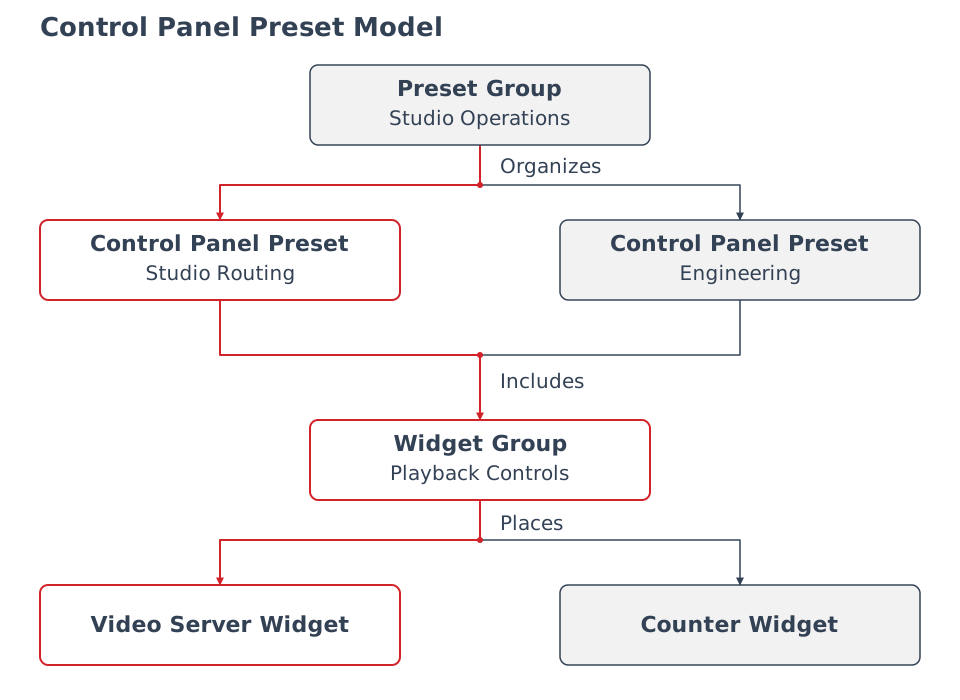
In this example, Studio Routing and Engineering include the same Playback Controls Widget Group. The arrows show organization and inclusion; permissions are reviewed separately through Access Control.
|
Object |
Purpose |
Example |
|---|---|---|
|
Control Panel Preset |
Stores the panel's filtering, presentation, and operating settings. |
A studio routing view with its required Widget Groups. |
|
Preset Group |
Organizes Presets on the Preset bar. |
A studio group containing separate routing and engineering Presets. |
Expand a Preset Group and select an individual Preset. The group organizes the selection; it does not represent a batch recall of those Presets.
The selected Preset determines which Widget Groups are included. A Widget Group's contents and a Preset Group's organization are separate configurations. See Widgets for reusable Widgets and assigned parameter controls.
What a Preset Retains
A Preset can retain Source and Destination Tag filters, excluded Tags, sorting, pinned items, and panel presentation settings. It also retains operating settings such as Take Mode and whether the Widget Area and assigned parameter controls are enabled.
Dynamic and Static Presets provide different panel arrangements. Use the Preset settings reference for exact settings and the Static Preset editor for explicit button layouts.
Caution
Check the selected Preset's Take Mode before routing. In Direct Take Mode, completing the Source and Destination selection changes the route immediately.
Presets, Snapshots, and Backups
|
Need |
Mechanism |
Example |
|---|---|---|
|
Reuse a panel's filtering and controls. |
Control Panel Preset |
Prepare a studio routing view. |
|
Reuse selected operational state. |
Snapshot |
Save selected Destination routes and parameter values for later recall. |
|
Preserve supported installation configuration for restore. |
Backup |
Download a configuration archive before a substantial change. |
A camera Preset, Counter timer Preset, or VB440 Widget Preset belongs to its own Widget workflow. Those names do not make them Control Panel Presets. See Configurations for Snapshot and Backup scope.
Example: Prepare a Studio Panel
A studio panel combines Tag-filtered studio Ports, a Control Panel Preset with the intended routing and presentation settings, the studio's Widget Group, and a Preset Group that organizes it. Create the Preset, include the Widget Group, and organize it into a group, then verify the panel with the intended operator's account.
This example prepares the panel. Use a Snapshot when the task also requires storing operational values for later recall.
Operational Implications
A Preset's visible Ports depend on the user's access as well as its filters. Assignment or inclusion in a group does not establish that an operator can control every referenced resource. Review Access Control and verify with the intended account.
Changing a shared Preset or Widget Group can affect the panels that use it. Review its use before saving changes or deleting it. Editing permissions and Hardware Panel delegation are covered by their procedures below.