
Configurations
Overview
Configurations preserve different parts of the hi installation for different purposes. A Snapshot supports production-state recall; a Backup preserves supported configuration data.
Caution
hi uses Snapshots for operational state recall and Backups for full system configuration persistence. These mechanisms serve different purposes; do not use them as substitutes for one another.
-
Snapshots - store selected operational state such as connections, parameters, labels, Tag assignments, and Port Container configurations.
-
Selective recall - restore only selected content types or selected Ports from a Snapshot.
-
Backups - save the active configuration database to a file for later restore or transfer.
Snapshots
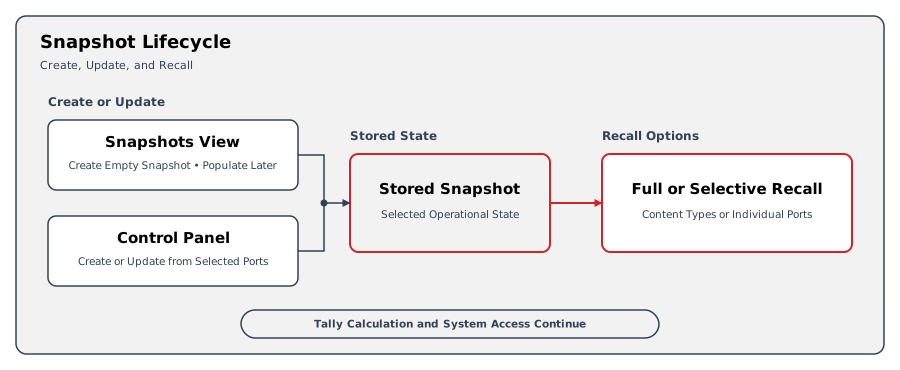
Snapshots store selected operational state for later recall. They do not replace a Backup of the complete supported configuration data.
A Snapshot can store connections, parameters, labels, Tag assignments, and Port Container configurations. See Snapshot components for what each component stores.
When recalling a Snapshot, operators can select content types and Ports instead of restoring every stored item. See Manage Snapshots for the supported creation, update, and recall workflows.
Backups
The supported configuration data includes Nodes, device connections, Port names, Presets, Wiring, Tally mappings, Rules, user accounts, and Snapshots.
The Backup workflow packages the supported configuration data into an archive that can be downloaded and restored later. See Manage Backups for creation, update, upload, restore, and deletion procedures.
Caution
Restoring a Backup replaces the active supported configuration data with the contents of the Backup.
Example: Prepare a Production and Protect Its Configuration
A production uses selected camera routes and pinned device parameters. Store those items in a Snapshot to reuse their operational state later.
Separately, create and download a Backup to preserve the installation's supported configuration data. That archive serves the supported restore or transfer workflow.
|
Need |
Mechanism |
Result |
|---|---|---|
|
Reuse selected production routes and parameter values. |
Snapshot |
The selected state is stored for later recall. |
|
Replace previously saved production values with current values. |
Snapshot update |
Saved values change; updating does not recall them into the live system. |
|
Apply the saved production values. |
Snapshot recall |
The selected saved values are applied to the live system, subject to recall constraints. |
|
Preserve supported installation configuration for restore or transfer. |
Backup |
A configuration archive can be downloaded and retained. |
Operational Implications
Updating a Snapshot and recalling it act in opposite directions. Update captures current values into saved state; recall applies saved state to the live system.
Caution
Snapshot updates overwrite saved values, while recall changes the live system. Review the stored scope before either operation. Locked Destinations remain unchanged during recall.
A Snapshot does not provide full configuration recovery protection. A Backup does not establish that infrastructure or database health has recovered.
For infrastructure faults, follow A Multi-Server Installation Reports a Server or Service Fault.
Contact Riedel Customer Success before intervention.
Related Tasks and Reference
-
Create a Snapshot from Selected Ports - capture selected component values directly from the Control Panel.
-
Create a Snapshot from the Workspace - prepare a named, empty Snapshot to populate afterward.
-
Update Saved Snapshot Values - replace saved values with current state.
-
Recall a Snapshot - apply the complete saved scope.
-
Recall Selected Snapshot Items - apply only the required saved items.
-
Manage Backups - find the supported creation, download, restore, and transfer guidance.