
Using Marks is a fast and efficient way to tag important moments during live production.
It allows you to mark key actions instantly, even when you don’t have time to create a clip or build a playlist.
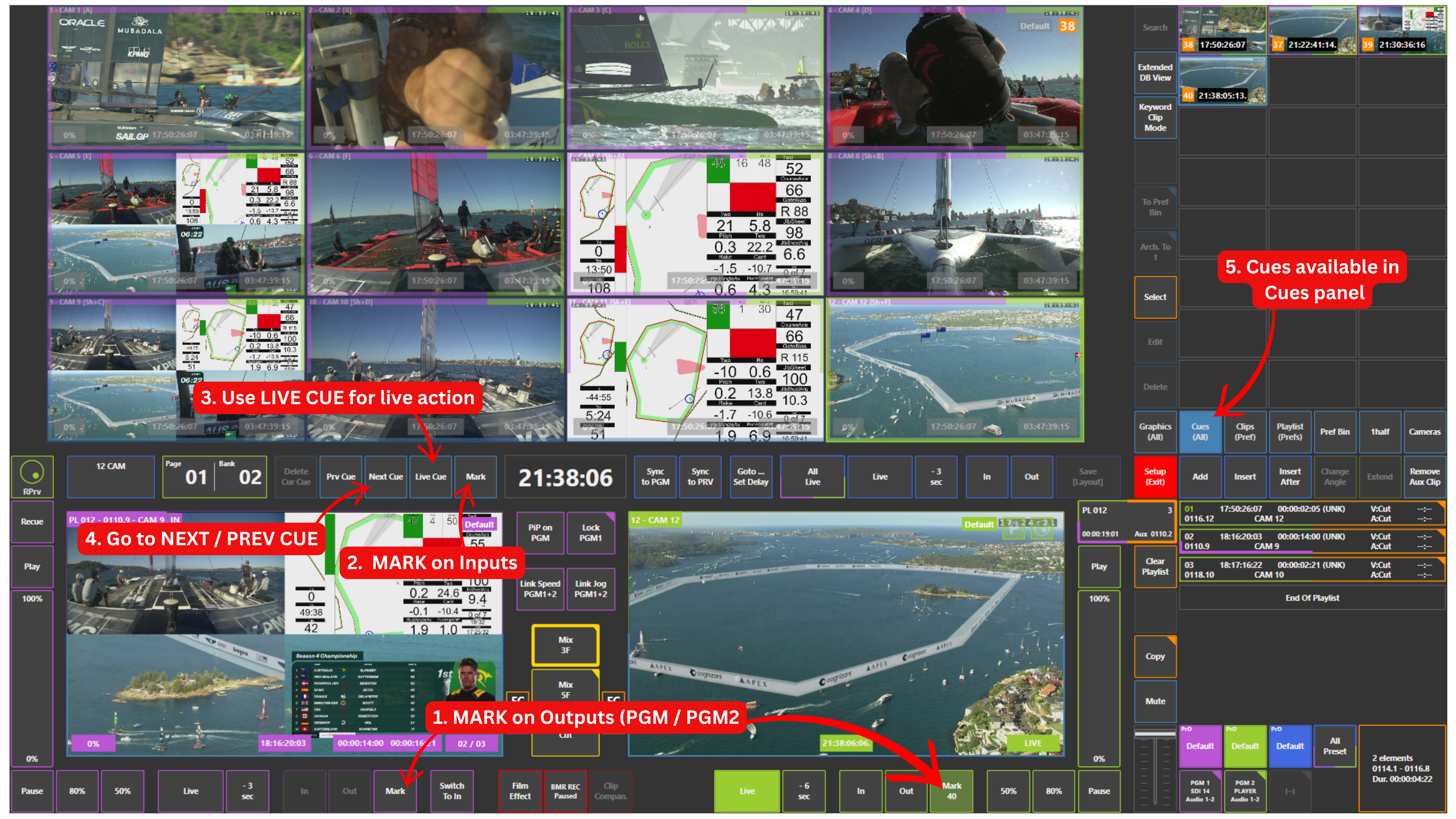
Marks can be placed on:
-
Outputs → Program or Preview / Program 2 (PGM2)
-
Inputs (cameras) → record trains
-
All marks are stored in the Cues panel, where you can access them later.
How to Place a Mark
Press the Mark button:
-
Under Program or Preview / Program 2 (PGM2) → marks the output
-
Under inputs (cameras) → marks the record trains
How to Access Marks
Open the Cues panel.
All saved marks will be available there.
Use:
-
Next Cue → go forward
-
Prv Cue → go backward
Pro Tip
Use Mark while playing out content on Program or Preview / Program 2 (PGM2).
This allows you to capture important moments live without interrupting your output.
Pro Tip
Mark key moments such as:
-
Goals
-
Fouls
-
Incidents
This makes it much faster to come back and build highlights later.
Pro Tip
Marks give you an additional layer of control.
You can:
-
play out content on outputs
-
browse inputs using the REPLAYS function
-
create clips or place marks at the same time
Pro Tip
Use Live Cue when something important happens on the live feed.
This lets you instantly mark the current live moment, even if you are not currently at live on your outputs.
Use Case – Live Production Scenario
You are playing an interview on Program 1 and running B-roll on Preview / Program 2 (PGM2).
At the same time, you are browsing inputs using the REPLAYS function, creating clips or placing marks from selected cameras.
While doing this, something important happens on the live feed.
You press Live Cue to instantly tag that moment.
In this situation, you are:
-
playing out content on Program 1
-
playing out content on Preview / Program 2 (PGM2)
-
creating clips or marking moments from inputs using the REPLAYS function
-
tagging a live moment using Live Cue
All at the same time, without interrupting your outputs.