
Manage Snapshots
Overview
A Snapshot stores selected operational values, such as connections and supported parameter settings, for later recall. Use Snapshots to prepare a production state, compare saved and live values, or restore the saved state within the selected scope.
Read Configurations for how updating and recalling a Snapshot differ and how Snapshots relate to Backups. Use Manage Backups to protect or transfer the supported installation configuration.
Start Here
For the common workflow, create a Snapshot from selected Ports in the Control Panel. Select the Ports and component types whose current state you want to save, inspect the saved components, then recall the Snapshot when needed.
Choose the creation path that fits your task:
|
Starting point |
Use it when |
Result |
|---|---|---|
|
Control Panel |
You want to capture the current state of selected Ports. |
A new Snapshot containing the selected components. You can also add them to an existing Snapshot. |
|
Snapshots workspace |
You want to prepare a named Snapshot and populate it afterward. |
An empty Snapshot. Add Destination Ports or capture selected components from the Control Panel before recall. |
Explore
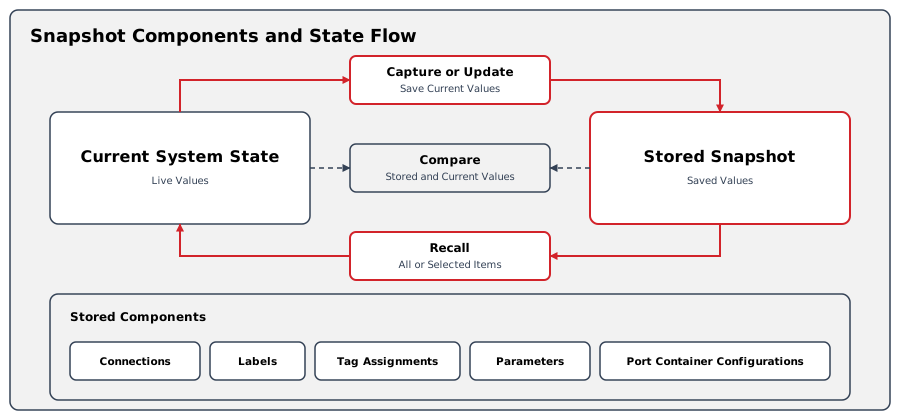
Snapshot Components
Snapshot components. Check which operational values can be saved.
Creating a New Snapshot
Create a Snapshot from Selected Ports. Use the Control Panel to select Ports and save their current component values in a new Snapshot, or add them to an existing Snapshot.
Create a Snapshot from the Workspace. Create a named, empty Snapshot, then add the connection scope using Add Destination Ports, or add selected components from the Control Panel.
Snapshot List View
Snapshot List View. Find list actions, folders, and filtering controls.
Reviewing a Snapshot
Reviewing a Snapshot. Inspect saved values and their comparison with live state.
Recalling a Snapshot
Recall a Snapshot. Apply saved Snapshot values to the live system, for the complete saved scope.
See Recall Selected Snapshot Items.
Updating a Snapshot
Update Saved Snapshot Values. Replace saved values with current live state, for the full saved scope.
See Update Selected Snapshot Items.
Adding Ports to a Snapshot
Add Destination Ports to a Snapshot. Extend the saved connection scope with selected Destination Ports.
Cloning a Snapshot
Clone a Snapshot. Create a duplicate using either saved values or current live state.
Deleting Snapshots
Delete a Snapshot. Permanently remove one or more saved Snapshots.
Renaming a Snapshot
Rename a Snapshot. Change a saved Snapshot's display name.
Next Steps
-
Use Control Panel to verify recalled routing and parameters.
-
Use Manage Backups when the complete configuration must be protected or transferred.