
Configure Panel Groups
Overview
A Hardware Panel Group combines several Hardware Panels into one Node. Use the Panel Group Setup tab to review the group's members and arrange them in a three-column layout. To create a group, see Link Panels.
Prerequisites
-
Use Node admin and open Inventory > Nodes.
-
A Hardware Panel Group exists. To create one in the Node List, select at least two Hardware Panels and select Link Panels. Riedel SmartPanel devices cannot be linked. A selection can include at most one existing group.
-
For product information, see the Hardware Panels catalog.
Open Panel Group Setup
-
In Inventory > Nodes, open the Hardware Panel Group.
-
Select the Panel Group Setup tab. It appears only for a group that has member panels.
-
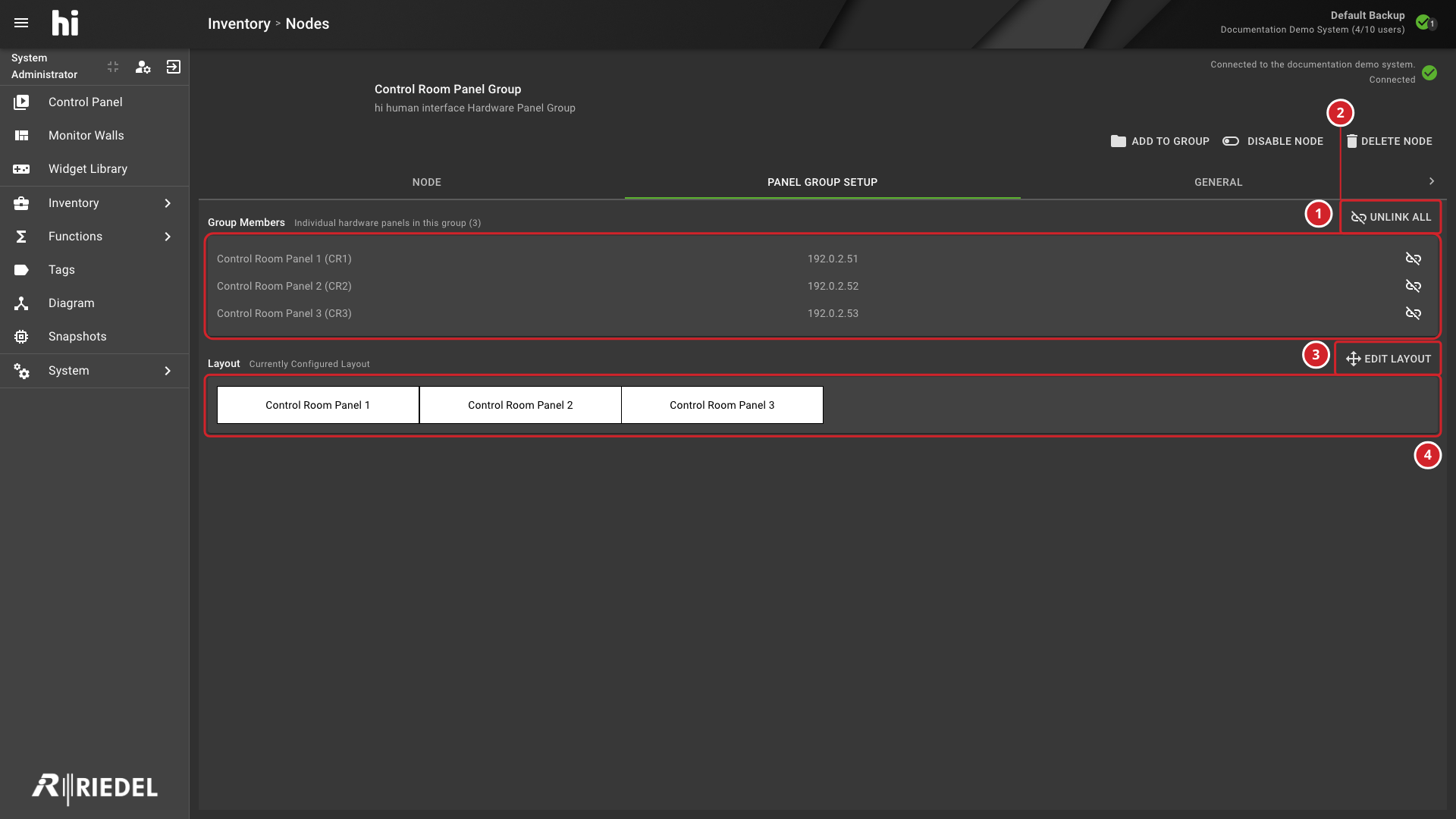
Review Group Members. Each row shows the panel name, its short name, and the IP address, or unknown IP address.
-
Group Members, which lists the panels in the group with their IP addresses and unlink buttons.
-
Unlink all, which removes the group.
-
Edit Layout, which opens the layout editor.
-
The Layout area, which shows the saved arrangement of the panels.
Arrange the Layout
-
Select Edit Layout.
-
In Edit Group Layout, drag panel blocks to rearrange the layout. Each panel snaps to one of three columns, and the layout compacts vertically.
-
Select Save. Select Cancel to discard changes.
The Layout area shows the saved arrangement under "Currently Configured Layout".
Remove Panels from the Group
-
To remove one panel, select its unlink button in Group Members. Confirm Removing panel from group.
-
To remove the whole group, select Unlink all. Deleting Panel Group unlinks the individual panels and returns them to the Node List. All Presets delegated to this group become undelegated.
Adding panels to an existing group asks you to confirm Add panels to the group: the added panels lose their current configuration.
Verify the Result
Return to Panel Group Setup and confirm that Layout shows the intended order. Check the physical panels to confirm the layout.
Next Steps
Return to Manage Nodes for other Node List operations.