
Map Baseband Ports to IP Ports
Overview
A baseband Node has Ports that connect to IP resources of an NMOS Node. Assign IP resources to the baseband Ports to record this relation in hi. The IP mapping tab of the baseband Node then lists each relation with the linked device, the IP Port, its format, and its Multicast Address and Source IP.
Prerequisites
-
Use Node admin and open Inventory > Nodes.
-
At least one NMOS Node exists in the system. Without an NMOS Node, hi hides Assign IP resources. See NMOS Core Integration.
-
The baseband Node has Ports. Open it and select Labels.
-
The Ports that you map are all inputs or all outputs, and all have the same format. The Node that you open is not itself an NMOS Node.
Assign IP Resources
-
On the baseband Node, select Labels.
-
Select the Ports to map. Filter by direction, format, or text to find them.
-
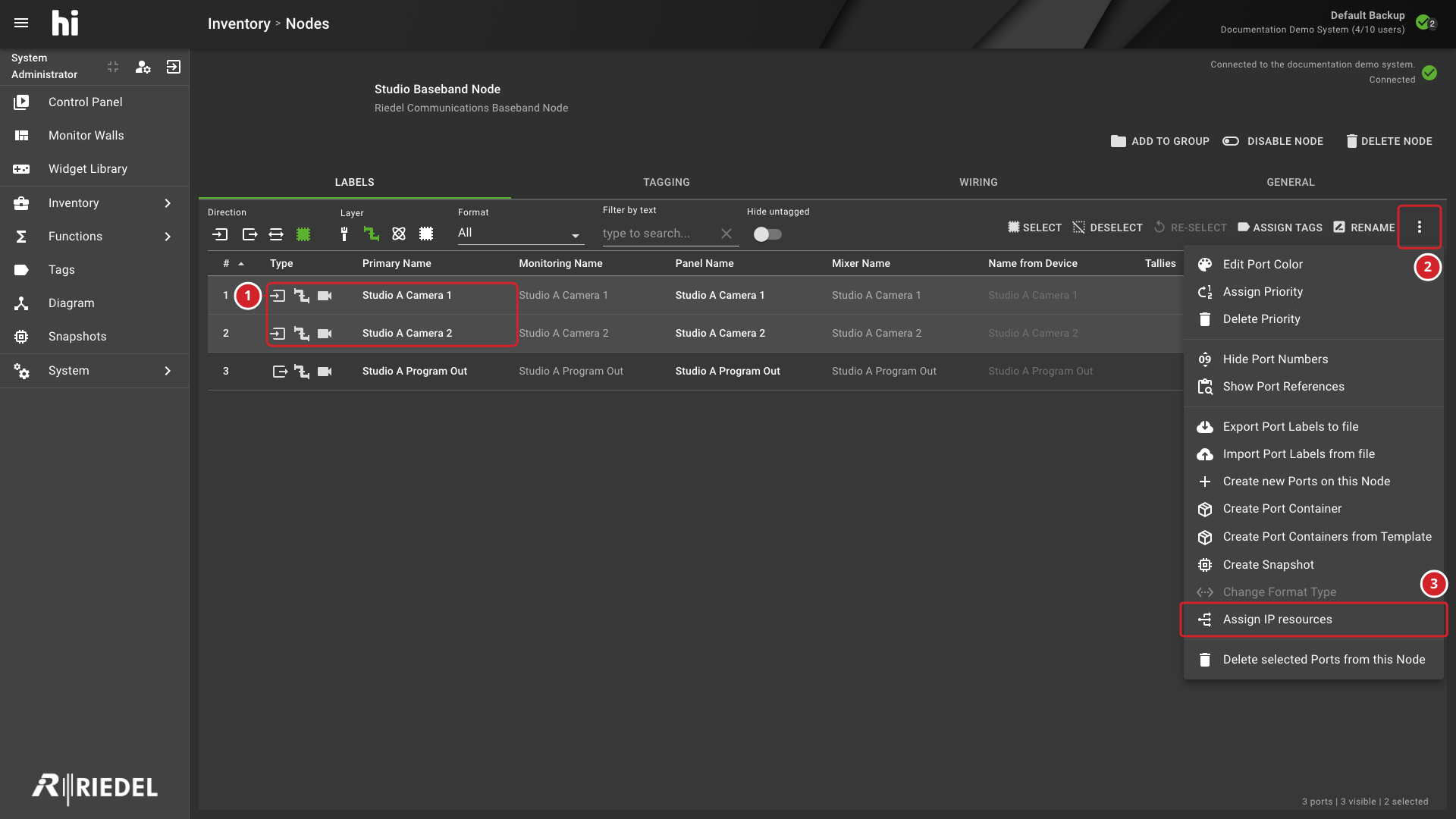
Open the three-dot menu of the Port list and select Assign IP resources.
Assign IP resources is unavailable when no Port is selected, when the selection contains both input and output Ports, or when the selected Ports have different formats.
-
In the Port Picker, select the IP Ports to assign. The dialog is titled Select N Ports to assign, where N is the number of selected Ports. It shows the By Node view of the NMOS Nodes. Select exactly as many IP Ports as you selected baseband Ports.
-
Select Assign.
-
The two selected input Ports, which have the same format.
-
The three-dot menu of the Port list.
-
Assign IP resources, which opens the Port Picker.
hi pairs the selected baseband Ports with the selected IP Ports one to one. If a baseband Port already has a mapping, Assign replaces that mapping.
Review the Mappings
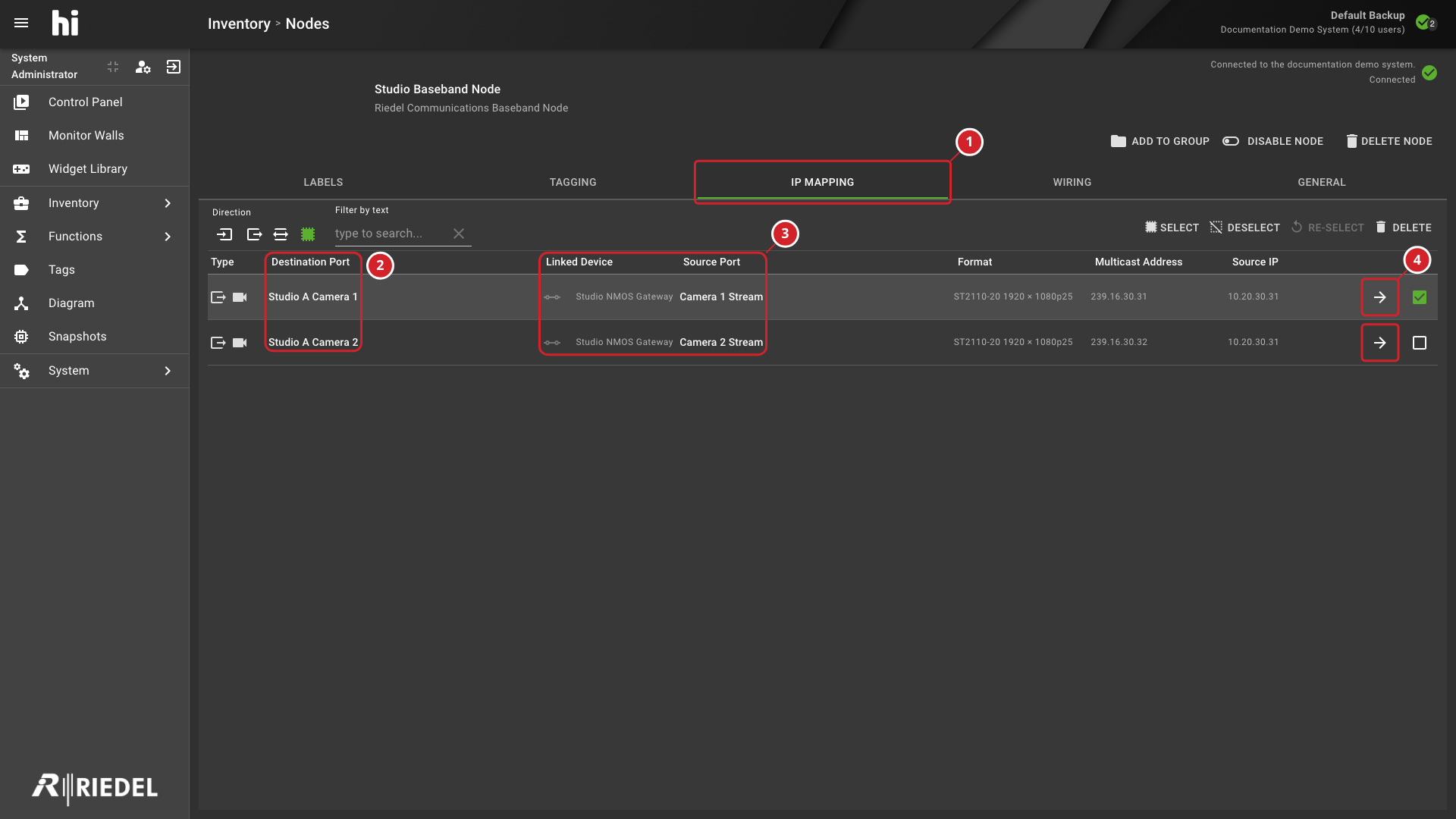
After the first mapping exists, the baseband Node shows the IP mapping tab. Select it to review the mappings of this Node.
|
Column |
Content |
|---|---|
|
Type |
The Port type icons of the IP Port. |
|
Destination Port |
The name of the baseband Port. |
|
Linked Device |
The name of the Node that owns the IP Port. |
|
Source Port |
The name of the IP Port. |
|
Format |
The format of the IP Port. |
|
Multicast Address |
The Multicast Address of the IP Port. |
|
Source IP |
The Source IP of the IP Port. |
Use the direction selector, the Format selector, and Filter by text (type to search...) to narrow the list. The text filter searches the Port names, the device names, the format, the Multicast Addresses, and the Source IPs. Select a row action Jump to related IP device to open the IP tab of the linked Node.
-
The IP mapping tab, which appears after the first mapping.
-
The Destination Port column, with the baseband Ports.
-
The Linked Device and Source Port columns, with the Node and the IP Port of each mapping.
-
The Jump to related IP device button of each mapping, which opens the IP tab of the linked Node.
Delete a Mapping
-
On the IP mapping tab, select the mappings to delete. Use Select, Deselect, and Re-select to change the selection.
-
Select Delete.
-
Confirm Delete IP mapping.
When you delete the last mapping of the Node, hi removes the IP mapping tab. If you have it open, hi returns to Labels.
Verify the Result
Open the IP mapping tab and confirm that each mapped baseband Port shows the intended Linked Device, Source Port, and Format.
Next Steps
Use Manage Multicast Addresses to review or change the Multicast Addresses of the IP Ports.