
In SimplyLive, multiple camera inputs can be recorded at the same time. You can switch between these camera angles directly from the controller.
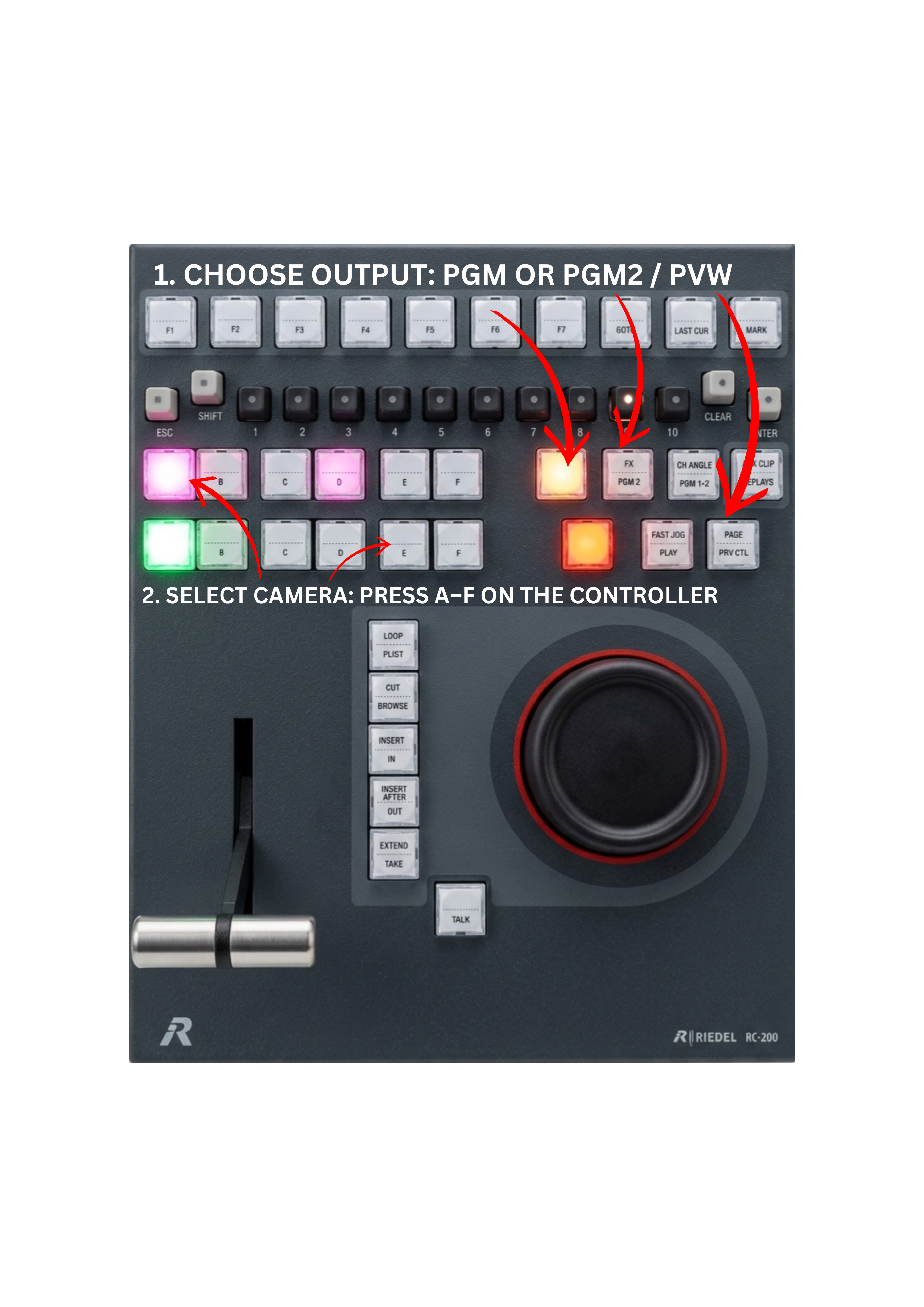
On the controller, the buttons A, B, C, D, E, and F represent different camera inputs recorded on the server. Each button corresponds to a specific camera angle.
In most configurations, two outputs are available: PGM (Program) – the main replay output, and PGM2 / PVW (Program 2 / Preview) – used to prepare or review replays.
To switch the camera angle, press the corresponding camera key (A–F) on the controller. The selected camera angle will immediately appear on the Program or Preview output, allowing operators to quickly choose the desired view during production.
Pro Tip
If your production uses more than six camera inputs, additional angles can be accessed using the SHIFT key:
SHIFT + A → Camera 7
SHIFT + B → Camera 8
SHIFT + C → Camera 9
SHIFT + D → Camera 10
SHIFT + E → Camera 11
SHIFT + F → Camera 12
This allows operators to quickly access up to 12 camera angles directly from the controller.
The Replay Controller includes two dedicated rows of A–F camera keys.
The upper A–F row is used to select camera angles on Program.
The lower A–F row is used to select camera angles on Preview.
This gives operators direct access to camera angle selection for both outputs, making it easier to switch or prepare replay angles quickly during live operation.
Pro Tip
One quick way to check all angles stored in a clip is to toggle through them using the clip key.
Press the clip key (1–10) containing the clip multiple times. Each press cycles through the available camera angles stored inside that clip.
This method allows operators to quickly preview every angle of the same action without needing to manually search for separate clips.
Info
A single clip can contain multiple camera angles of the same action.
For example, in Clip 111 (Page 1, Bank 1, Position 1), the clip may include several angles recorded at the same moment:
-
A angle – primary or main camera
-
B angle – secondary camera
-
C angle – additional perspective
-
D, E, F angles – other available cameras
All of these angles belong to the same clip, allowing the operator to quickly switch perspectives during playback.