
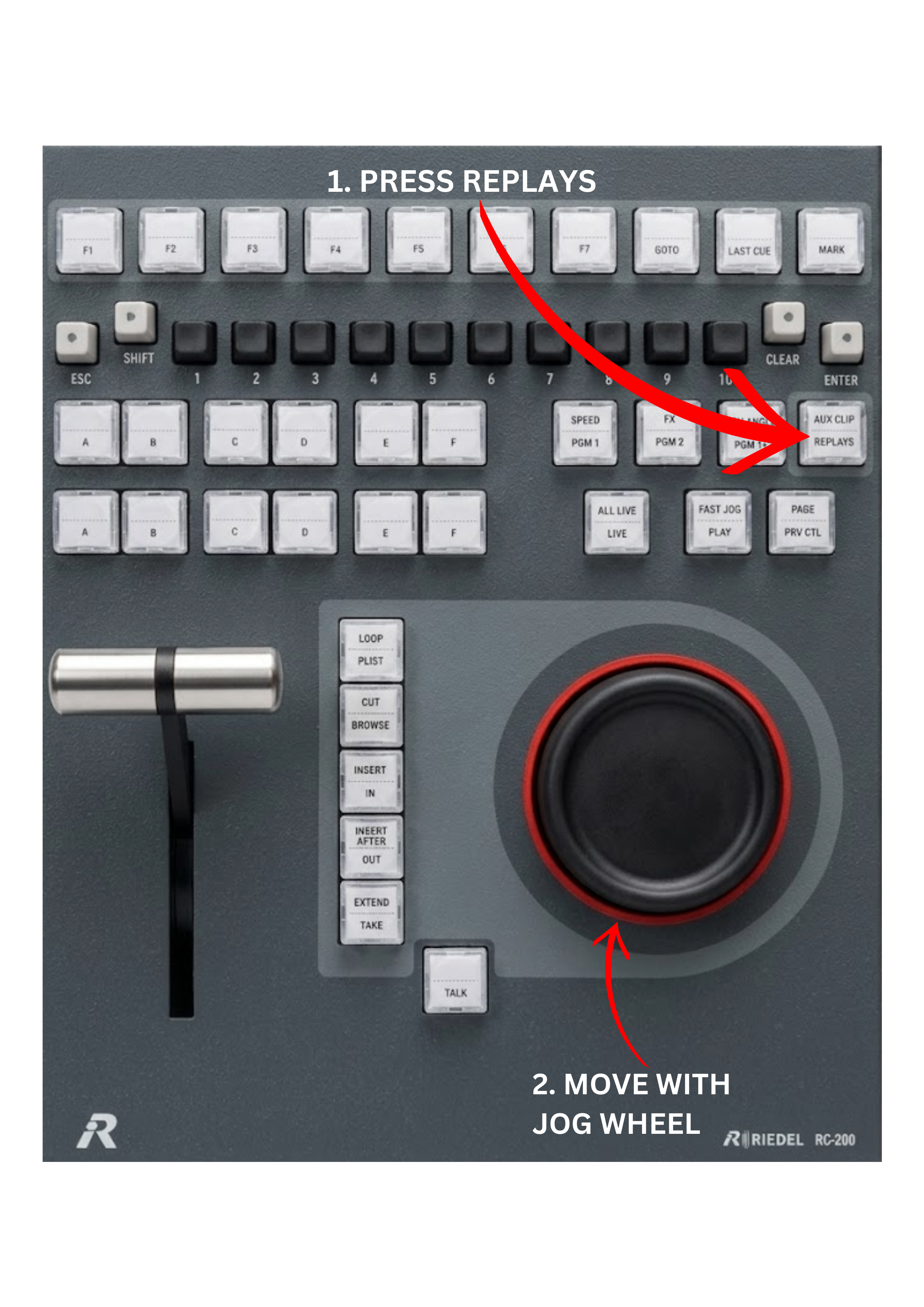
The REPLAYS key allows operators to move all camera inputs together through the record train. Instead of switching between camera angles individually using the A–F keys, the REPLAYS function lets you scroll all inputs simultaneously.
This makes it possible to preview every available camera angle at the same moment and quickly identify the best view for a replay.
To use the REPLAYS function:
-
Press the REPLAYS key.
-
Use the JOG wheel to move backward or forward through the record train.
All camera inputs will move together, allowing you to instantly compare every angle at the same time.
This function is especially useful when communicating with the vision switcher or director, as it allows you to quickly confirm which camera captured the best shot of the action.
Pro Tip
A common question from the vision switcher or director is:
“Do you have it from camera 5 or camera 8?”
Without the REPLAYS function, operators often have to switch between camera angles using the A–F keys, repeatedly scrolling back and forth to check each camera individually.
With REPLAYS, you can see all camera angles at once and quickly determine which camera provides the best replay.
Pro Tip
You can press the LIVE key to return your Program outputs (PGM1 and PGM2) to the current live moment, while still using the REPLAYS function to scroll through earlier moments on the inputs. This allows you to keep the broadcast on the live action while continuing to search the record train for the best replay angle.
Pro Tip
The REPLAYS function is also very useful when preparing multiple replays in sequence.
For example:
-
Select the best camera angle and load the replay on Program.
-
Prepare the next angle on PGM2 / Preview.
-
Press TAKE to send the preview replay to Program.
-
Prepare the next replay on PGM2 / Preview and repeat the process.
Because all camera inputs are visible at once, operators can quickly identify the best sequence of angles for the replay session, such as wide shot → close-up → player reaction → crowd reaction.
Info
In sports broadcasting, a common replay structure follows the inverted pyramid principle. The sequence typically starts with a wide shot to show the full context of the action and then progresses toward closer angles, finishing with detailed reactions such as players or crowd shots.
Different production formats may use different replay structures depending on the type of event or show.