
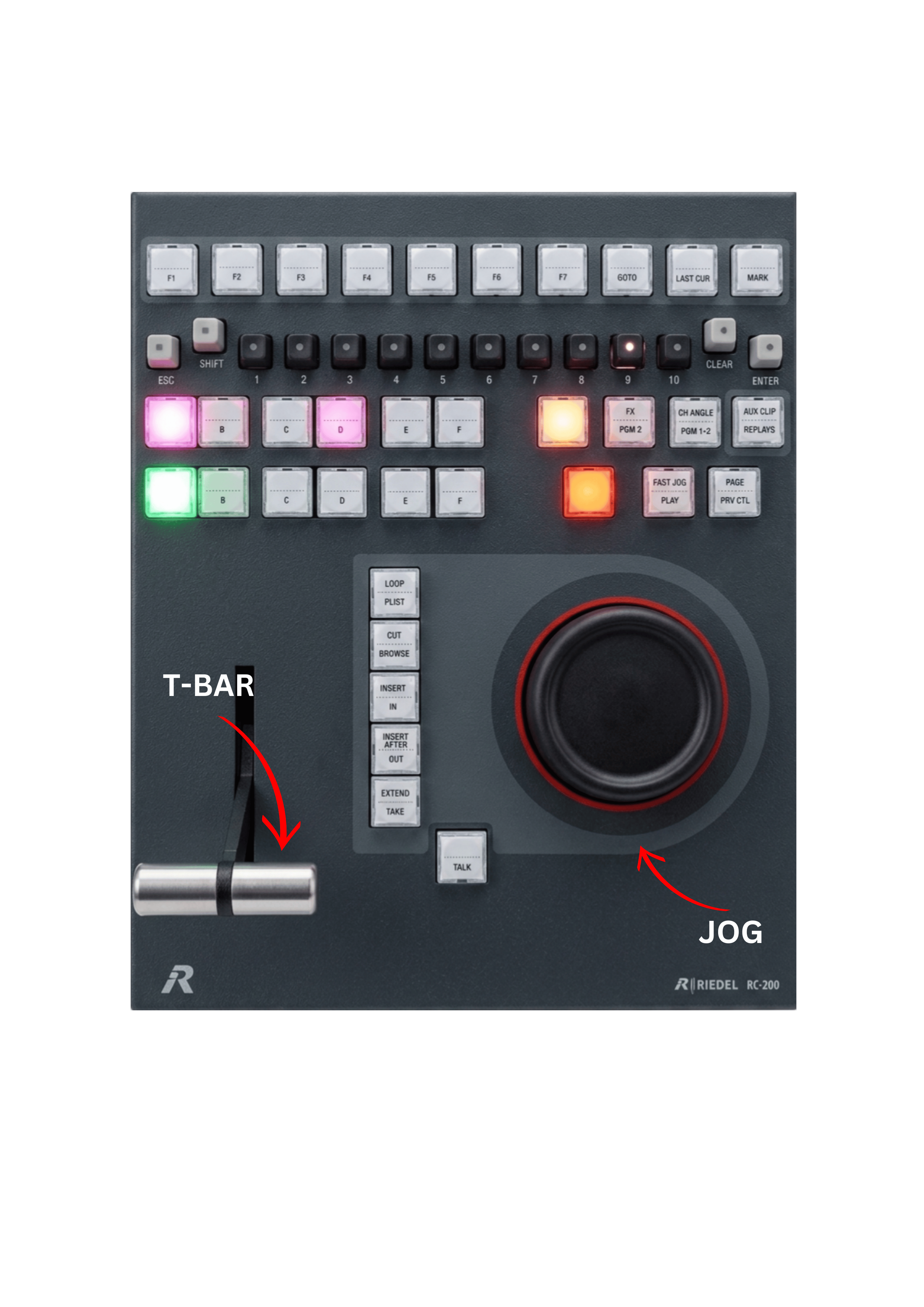
The SimplyLive replay controller provides two primary tools for controlling replay playback:
-
T-BAR – for dynamic speed control
-
JOG WHEEL – for precise frame navigation
These controls allow the operator to adjust replay speed and position with high accuracy during live production.
T-BAR
The T-BAR is used to control the playback speed and direction of the replay.
Moving the T-BAR forward or backward adjusts the playback speed in real time, allowing the operator to smoothly transition between slow motion, normal speed, and reverse playback.
Typical usage includes:
-
Gradually slowing down a replay moment
-
Accelerating playback back to real time
-
Playing clips in reverse to review actions
The physical movement of the T-BAR provides intuitive control over replay speed, which is especially useful when matching the timing requested by the director.
JOG WHEEL
The JOG WHEEL provides precise frame-by-frame navigation within a clip.
Rotating the JOG WHEEL allows the operator to move forward or backward through the clip with very fine control.
This is commonly used when:
-
Identifying the exact frame of an important moment
-
Navigating to IN and OUT points
-
Preparing clips for replay or highlight packages
Because the JOG WHEEL allows extremely fine adjustments, it is an essential tool for accurately locating key frames during replay analysis.
Combined Operation
The T-BAR and JOG WHEEL are often used together during replay operation.
A typical workflow may include:
-
Using the JOG WHEEL to locate the exact moment of interest
-
Navigating to the required clip position
-
Using the T-BAR to control the playback speed during replay
This combination allows operators to move quickly from precise frame navigation to dynamic replay presentation.
Operational Importance
During live sports production, replay operators must react quickly while maintaining precise control over clip timing.
The combination of the T-BAR and JOG WHEEL allows operators to:
-
Control replay speed smoothly
-
Navigate clips with frame-level precision
-
Respond quickly to director requests
-
Deliver accurate and visually clear replays
These controls form a core part of the replay workflow and are used constantly during live broadcast operations.
Pro Tip
The playback speed is directly proportional to the T-BAR position.
If you push the T-BAR to its maximum forward position, the playback runs at 100% speed.
At the midpoint, playback runs at 50% speed.
Positioning the T-BAR at approximately one-third of its range results in about 33% playback speed.
This proportional control allows the operator to precisely adjust how dramatic or detailed the replay appears on-air.