
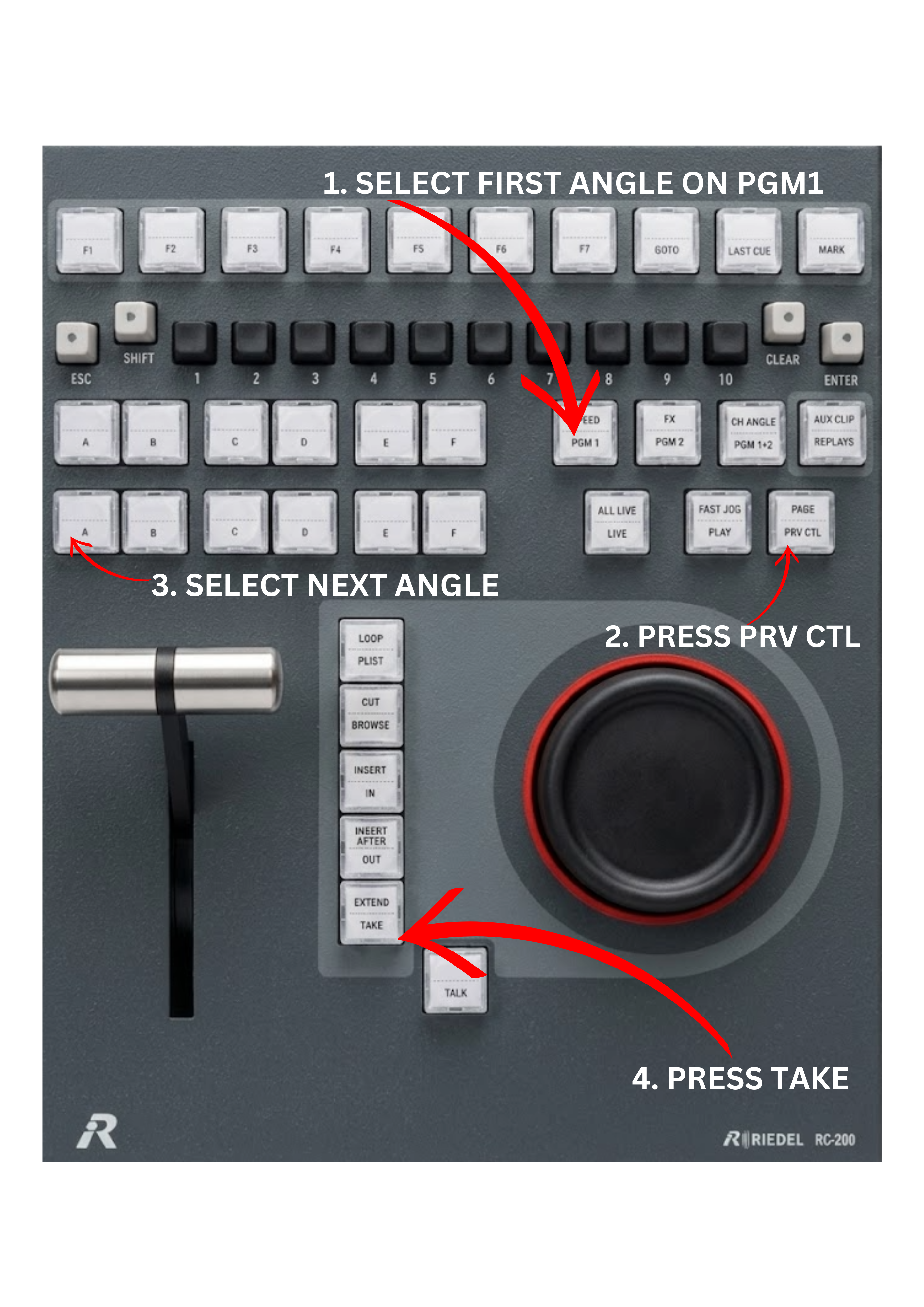
When working in Program / Preview mode, the TAKE key allows you to send the Preview output (PRV CTL) to the Program output (PGM1). This makes it possible to build and control a sequence of replay angles during a replay session.
To perform a replay sequence:
-
Select PGM1 and load the first replay angle by choosing the appropriate BANK and PAGE.
-
Switch to PRV CTL (Preview Control).
-
Load the next replay angle from the desired BANK and PAGE.
-
Press TAKE to move the preview replay to Program.
-
Load the next replay on PRV CTL.
-
Press TAKE again to continue the replay sequence.
This workflow allows the operator to smoothly present multiple replay angles in a controlled order.
Warning
It is strongly advised not to play replay sequences from stored clips, but instead from the record train camera angles.
When a replay is played from a clip, the clip will stop when it reaches its OUT point. If the vision switcher does not return to the live feed in time, the replay will end and the broadcast output may freeze.
Using replay angles directly from the record train avoids this problem. If the director or vision switcher stays longer on the replay than expected, the record train will continue playing normally instead of stopping.
In live broadcasting, a frozen frame on air is one of the worst possible outcomes, so using the record train for replay sequences is considered best practice.