
Assign Roles to a Microsoft Entra ID User Group
Overview
Apply role assignments to every member of an imported Microsoft Entra ID user group.
Information
These User Group workflows require Microsoft Entra ID authentication. They are not supported for local users or non-Entra deployments.
Prerequisites
-
Use an account with the User admin role.
-
Open System > Users.
-
Confirm that Microsoft Entra ID authentication is enabled in System > System Settings.
-
Open the Groups tab and identify the imported Microsoft Entra ID user groups to change.
Assign the Roles
-
Find the group in the Groups tab.
-
Select its Edit icon.
-
Assign the required roles from the categorized role list.
-
Select Save.
Roles assigned to a group apply to all group members.
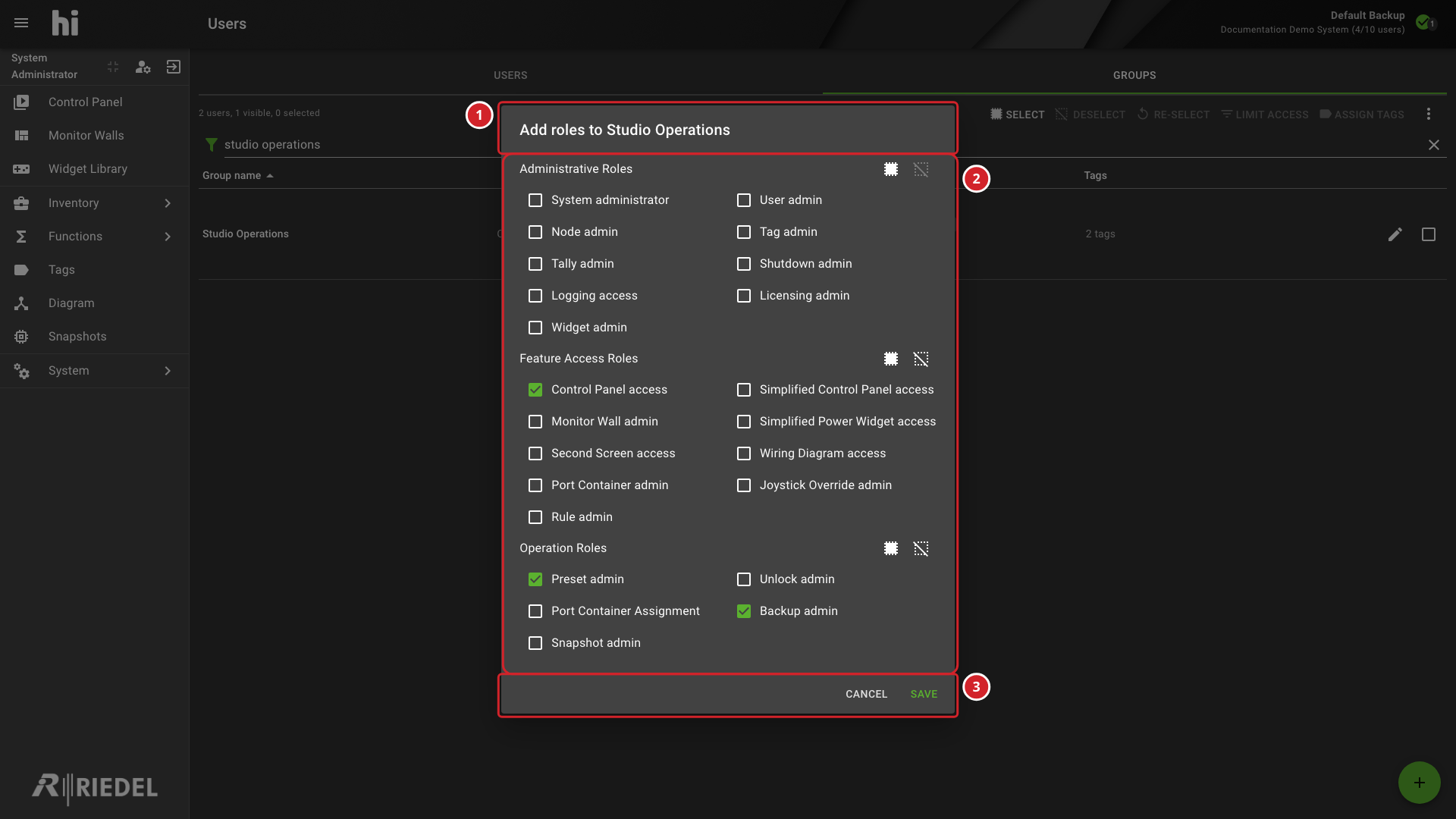
-
The Studio Operations group whose role assignments are being edited.
-
Roles grouped by category, including Control Panel access, Preset admin, and Backup admin.
-
Select Save to apply the role changes, or Cancel to discard them.
Verify the Result
Open Account Information on the Users tab for a member of the group, and confirm the roles and Tags that the user inherits from the group. Sign in with a test account to verify access changes.
Next Steps
Use Assign Tags to a Microsoft Entra ID User Group to configure Port access.