
Edit a User
Overview
Update an existing account's settings and assigned roles.
Prerequisites
-
Use an account with the User admin role.
-
Open the Users list and identify the accounts to change.
Edit the Account
-
Select the user in the Users list.
-
Select Edit.
-
Update the required settings. Select Reset Password when a new password is needed. For Entra ID users, Display Name and the password cannot be changed in hi.
-
Select Save.
Information
The Login Name cannot be changed. See the account field reference for the editable settings.
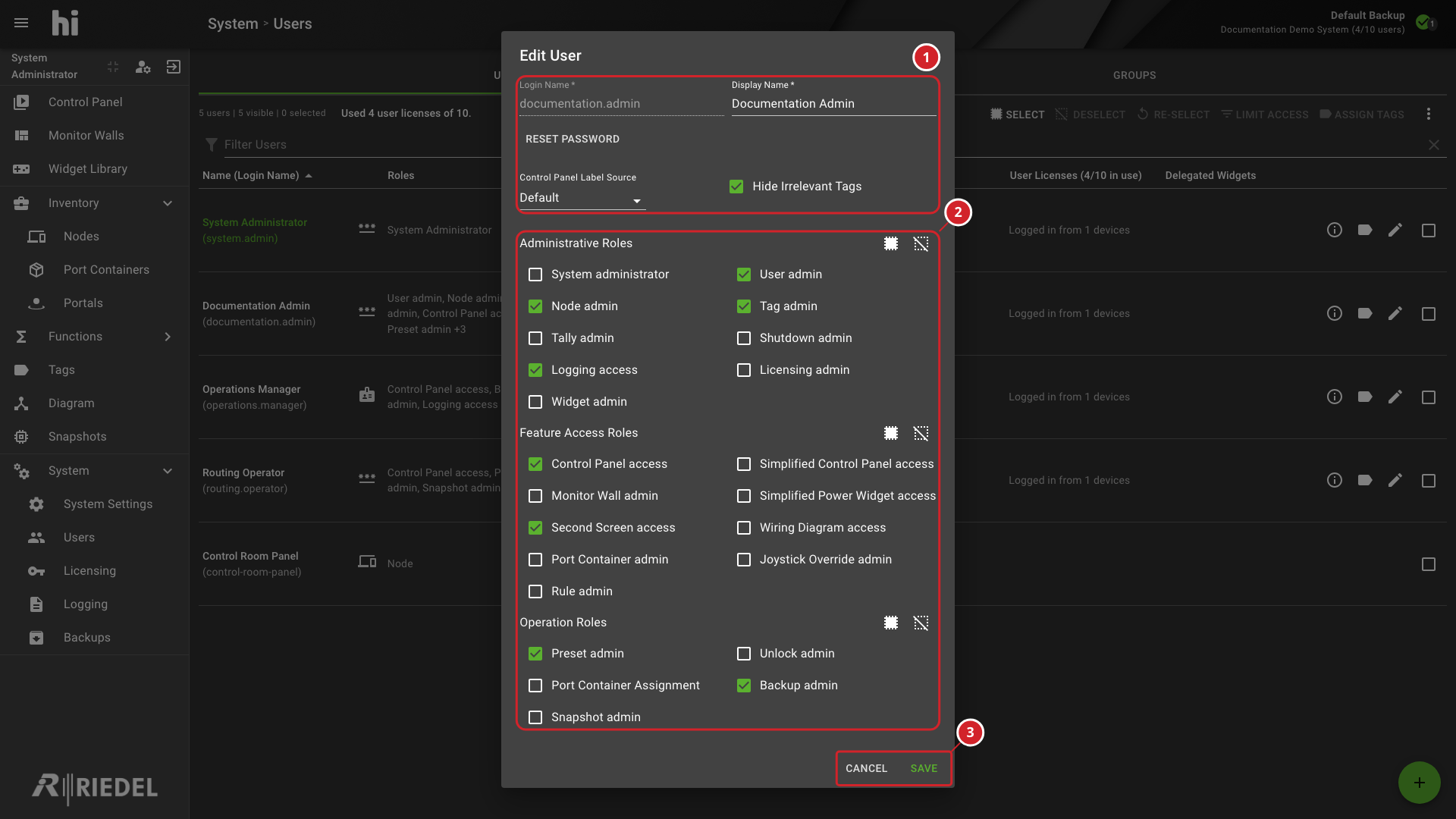
-
Review the identity, password, Label Source, and Tag-visibility settings.
-
Review and update roles in the Administrative, Feature Access, and Operation groups.
-
Select Save to apply the changes, or select Cancel to discard them.
Verify the Result
Open Account Information for the affected user and confirm the effective settings. Sign in with a test account to verify access changes.
Next Steps
Use Inspect Account Information to review the effective configuration.