
Set a Port or Port Container Priority
Overview
Change the display order of Ports and Port Containers when the Port list is sorted alphabetically.
Prerequisites
-
For Ports, use Node admin and open Inventory > Nodes, then open the Node's Labels view.
-
For Port Containers, use Port Container admin and open Inventory > Port Containers.
-
The installed license must enable Port priority; Assign Priority is hidden when this feature is unavailable.
-
To check the result, use Control Panel access and a Preset showing the affected items.
Priority values order Ports and Port Containers when the Port list is sorted alphabetically. Ports with equal priority are sorted by name. Port-number sorting ignores priority. Verify the resulting order in the intended Preset.
Set the Priority
-
In the applicable administration list, select the Ports or Port Containers to change.
-
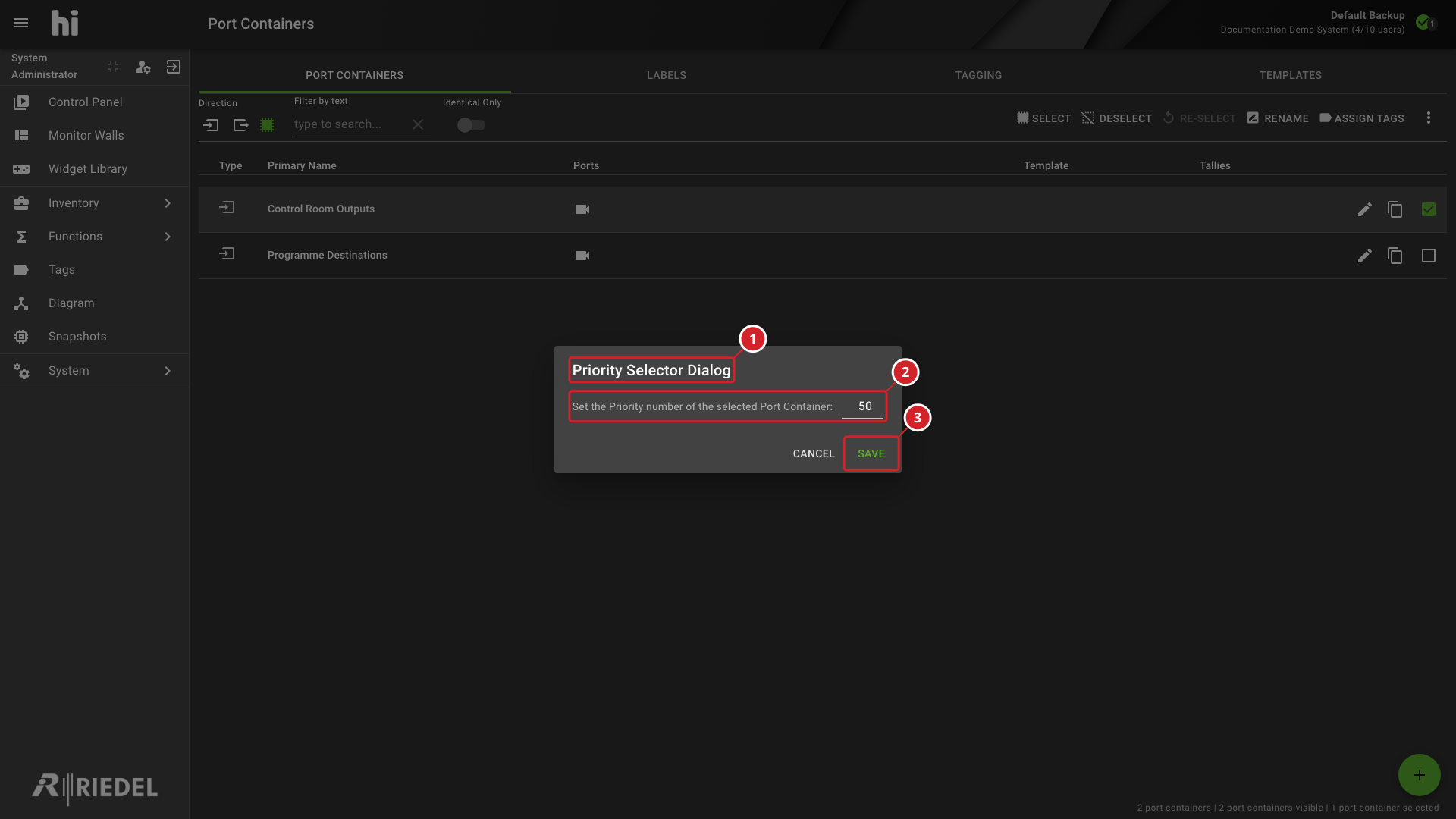
Open the three-dot menu and select Assign Priority to open Priority Selector Dialog.
-
Enter the priority value.
-
Select Save.
-
The Priority Selector Dialog applies to the selected Port Container.
-
Enter the priority number for the selected Port Container.
-
Select Save to apply the value.
Verify the Result
With alphabetical sorting selected, confirm the expected display order.
Next Steps
Return to the Use the Control Panel task list.